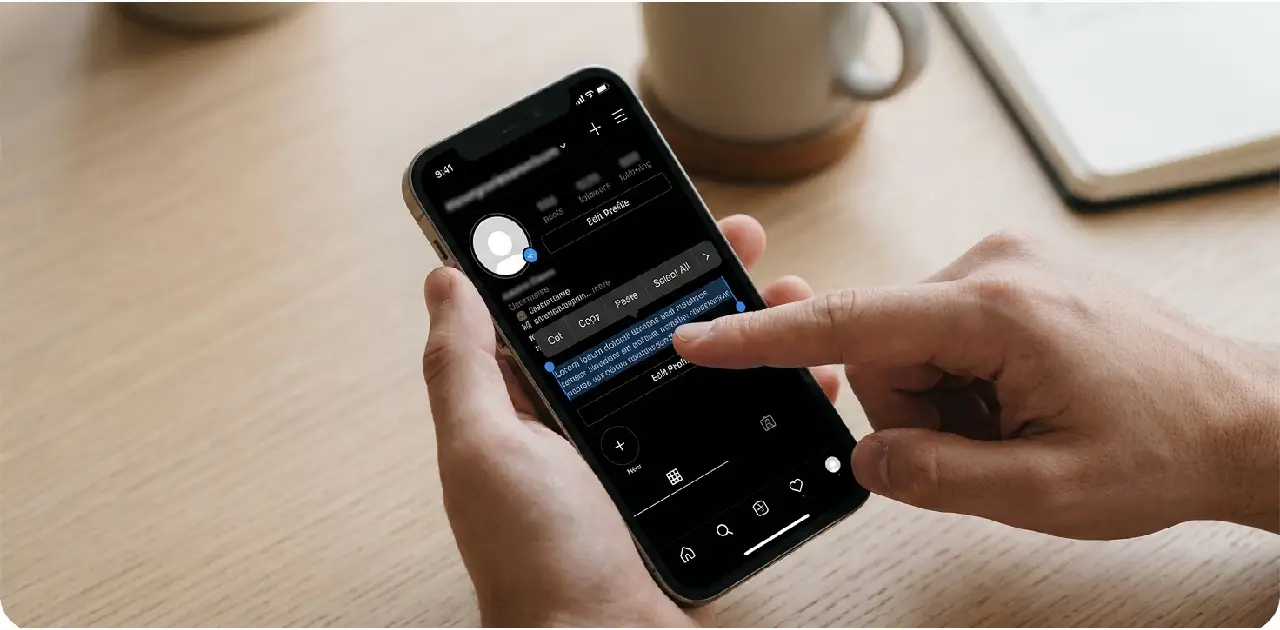

Instagram Bio Copy and Paste: Step-by-Step on Any Phone
Copying a bio sounds easy. Then you paste it, and the line breaks vanish, a symbol turns into an empty box, or Instagram says the text is too long.
Most of these problems have simple causes. Hidden spaces, special letters, and different devices all play a part.
This guide shows you how to copy and paste an Instagram bio on iPhone, Android, and desktop. You will learn a clean-paste routine, a troubleshooting table, copying etiquette, and safety tips. You also get 80+ paste-ready bios, including two- and three-line versions in code blocks that are easy to copy exactly.
The Fast Version (Under 2 Minutes)
If you are in a hurry, follow these steps.
- Copy the bio you like.
- Paste it into your Notes app first.
- Replace any [brackets] with your own details.
- Delete extra spaces at the start, end, and between words.
- Check the length. Stay under about 150 characters.
- Copy again from Notes.
- Paste into the Bio field in Edit profile and save.
- View your profile and fix anything that looks off.
The rest of this guide explains each step.
Why Copy and Paste Goes Wrong

Pasted text can carry hidden problems.
| Problem | Why It Happens |
|---|---|
| Missing line breaks | The app or device did not keep the breaks |
| Extra spaces | The source page added spaces you cannot see |
| Empty boxes | The phone does not support a special character |
| Text too long | Spaces and breaks count toward the limit |
| Strange formatting | Rich text from a web page carried over |
A middle step in a plain notes app removes most of these.
How to Copy and Paste on iPhone
Menus can change between versions, but the basic gestures are the same.
- Touch and hold the text you want to copy.
- Drag the handles to select the whole bio.
- Tap Copy.
- Open your Notes app, tap a blank note, then touch and hold, and tap Paste.
- Edit the text, then select it all and tap Copy again.
- Open Instagram, go to Edit profile, tap the Bio field, touch and hold, and tap Paste.
- Save your changes.
How to Copy and Paste on Android
Phones from different brands may use slightly different labels.
- Long-press the text you want to copy.
- Drag the handles to select the whole bio.
- Tap Copy.
- Paste it into a notes app and clean it up.
- Select all, then copy again.
- Open Instagram, go to Edit profile, long-press in the Bio field, and tap Paste.
- Save your changes.
How to Copy and Paste on Desktop
If you edit your profile on a computer, the shortcuts are quick.
| Action | Windows | Mac |
|---|---|---|
| Copy | Ctrl + C | Cmd + C |
| Paste | Ctrl + V | Cmd + V |
| Select all | Ctrl + A | Cmd + A |
| Paste as plain text | Ctrl + Shift + V in many browsers | Cmd + Shift + V in many browsers |
Plain-text paste removes hidden formatting. It does not work in every program, so try it and see. Instagram’s website also has an Edit profile page, though its layout can differ from the app.
Move a Bio From Phone to Computer (or Back)
Sometimes you find a bio on one device and want to use it on another.
- Send it to yourself. Use a message to yourself, an email draft, or a notes app that syncs across devices.
- Avoid screenshots of text. You cannot copy words from an image easily.
- Check the result. Paste on the new device and look for missing breaks or boxes.
Where Should You Copy From?
Not every source is equally clean.
| Source | Clean? | Tip |
|---|---|---|
| This article’s code blocks | Very clean | Copy the whole block |
| Your own Notes app | Clean | Best place to prepare a bio |
| A plain web page | Usually clean | Paste into Notes first |
| A font generator | Often messy | May contain special characters |
| Another person’s profile | Varies | You may need to retype it |
| A chat or message | Usually clean | Check for extra spaces |
If you cannot select text from a profile or an image, retype it. It takes a minute and avoids hidden problems.
From Pasted Mess to Clean: Three Rewrites
Counts are exact and include spaces.
| Messy Paste | Characters | Clean Version | Characters |
|---|---|---|---|
| Hi!! I’m [NAME], a [JOB] in [CITY]!!! DM me for orders!!! | 57 | Sana · Pastry baker in Karachi. Orders by DM. | 45 |
| Student | [HOBBY] | [HOBBY] | Follow me back | Like | Share | 59 | Student | Sketcher | Night reader | 33 |
| @@@ Welcome to my page @@@ Like and follow and share @@@ | 56 | Slow mornings, honest food. | 27 |
Notice that the messy versions are long because of filler and unfilled placeholders. Cleaning them saves characters and reads better.
The 5-Step Clean-Paste Routine
Use this every time you paste a bio.
| Step | What to Do | Why |
|---|---|---|
| 1. Notes first | Paste into a plain notes app | Strips hidden formatting |
| 2. Fill the brackets | Replace [city], [name], and similar | Avoid visible placeholders |
| 3. Trim spaces | Remove doubles, leading and trailing spaces | Saves characters |
| 4. Count | Check the length against 150 | Prevents cut-off |
| 5. Preview | Check on your profile after saving | Catches breaks and boxes |
Fixing Common Paste Problems
| What You See | Likely Cause | Fix |
|---|---|---|
| Line breaks disappear | The field ignored them | Retype the break, or use periods |
| Boxes instead of symbols | The phone lacks that character | Replace with a normal symbol or emoji |
| “Too long” message | Over the limit | Cut words or remove spaces |
| Odd spacing | Hidden spaces | Retype the line in Notes |
| Text will not save | Unsupported characters | Remove special letters, restart the app |
| Looks different on another phone | Different fonts | Keep the key words in plain text |
If all else fails, retype the bio by hand instead of pasting.
Copying Etiquette: What Is Okay?
Using ready-made lines is common, but a few habits keep you on the right side.
- Generic lines are fine. Short, common phrases belong to everyone.
- Do not copy a business slogan. Brand taglines belong to their owners.
- Do not copy someone’s whole bio word for word. It is better to adapt it.
- Do not copy personal details. Names, cities, and contact lines should be yours.
- Give credit for quotes. If you paste a long quote from a person, credit them.
Instagram’s own rules and local laws may apply, so use your judgment and keep it original.
80+ Paste-Ready Bios
Each bio below is short, original, and works without brackets unless marked. Copy one, paste into Notes and personalize it.
For Personal Pages
- Slow walks and warm cups.
- Sunday light, tidy desk.
- Gathering good company.
- Mostly outside, sometimes asleep.
- Making room for small joys.
- Chai first, plans later.
- Lighthearted by choice.
- Photos from ordinary days.
- Learning to cook for friends.
- Soft hearts, steady habits.
For Students
- Notes, tea and long revisions.
- Studying hard, sleeping when I can.
- Curious about the whole syllabus.
- Library mornings, cafe afternoons.
- Learning out loud.
- Lab mornings, essay nights.
- Future teacher, current learner.
- Debugging after lectures.
- Midterm season veteran.
- Building skills one semester at a time.
For Creators
- Videos from a very small room.
- Sharing one lesson at a time.
- Drawing daily, improving slowly.
- Reviews with honest opinions.
- Short clips, long-term habits.
- Filming kitchens and quiet streets.
- New post every Thursday.
- Writing, editing, repeating.
- Learning in front of a camera.
- Telling stories in small frames.
For Small Shops
- Handmade soap, made weekly.
- Personalized gifts across [city].
- Orders open. Message to book.
- Small-batch candles, fresh Fridays.
- Crochet pieces, made to order.
- Printed notebooks and cards.
- Clothes stitched to fit.
- Home bakery. Order two days ahead.
- Local plants, delivered gently.
- Hand-painted tote bags.
For Work and Career
- Accountant helping small teams.
- Designer building calm brands.
- Junior developer, big curiosity.
- Nurse, reader, night-shift walker.
- Teacher making math less scary.
- Writer for tech and travel.
- Marketing graduate. Portfolio below.
- Tutor for science students.
- Editor of long, messy drafts.
- Freelancer. Slots open in [month].
For Travel and Food
- Collecting maps and street snacks.
- Weekend trips, window seats.
- Tea stalls in every town.
- Trying every dumpling shop.
- Packing light, planning loosely.
- Highways, hills and hot chai.
- Small restaurants, big flavors.
- Home recipes, tested often.
- Photos from places people skip.
- Sunsets and sandwiches.
Two-Line Paste-Ready Bios
Copy the whole block, including both lines. Check that the break survives after you paste.
Slow walks.
Warm cups.
Notes and tea.
Long revisions.
Small batches.
Orders by DM.
Maps in my bag.
Snacks in my pocket.
Designer.
Open for work.
Drawing daily.
Improving slowly.
Home bakery.
Order two days ahead.
Learning out loud.
Sharing the notes.
Weekend trips.
Window seats.
Kind hearts.
Clear plans.
Tea first.
Plans after.
Sunday light.
Tidy desk.
Three-Line Paste-Ready Bios
Writer for tech and travel.
Clear words, fast replies.
Email below.
Handmade candles.
Small batches, fresh Fridays.
Orders by DM.
Student, tutor, tea lover.
Science notes weekly.
Questions welcome.
Photographer.
Portraits and quiet streets.
Booking [month].
Hinglish Paste-Ready Bios
These lines avoid gendered verb endings, and each has its English meaning. Roman Urdu spellings vary.
| Style | Hinglish Bio | English Meaning |
|---|---|---|
| Personal | Dheeme din, garam chai. | Slow days, warm tea. |
| Student | Notes, chai aur revision. | Notes, tea and revision. |
| Creator | Roz ek chhota video. | One small video a day. |
| Shop | Haath ka bana, dil se pack. | Handmade, packed with heart. |
| Work | Kaam saaf, jawab jaldi. | Clear work, quick replies. |
| Travel | Naye shehar, purani chai. | New cities, familiar tea. |
| Food | Ghar ka khana, roz naya. | Home food, new every day. |
| Mood | Sidhi zubaan, halka mizaaj. | Straight speech, light mood. |
Add a short English line if your followers speak different languages.
Build a Paste-Ready Bio From Scratch

You do not have to copy at all. If you would rather build a bio and then paste it, follow this method.
- Open Notes and write three lines. One for who you are, one for what you share, one for a next step.
- Read them aloud. Cut any word that sounds like filler.
- Choose one line to keep. Many bios work best with just one.
- Check the count. A quick check keeps you under the limit.
- Copy and paste into the Bio field. Preview it afterward.
Starting in Notes also means your text is already clean, so there is nothing to fix after you paste.
Symbols, Emojis and Fonts
Decoration is where most paste problems start.
| Element | Paste Risk | Tip |
|---|---|---|
| Common emojis | Low | Paste from your emoji keyboard |
| Middle dot (·) | Low | Usually safe |
| Vertical bar (|) | Low | Safe and tidy |
| Rare symbols | Medium | May show as boxes on some phones |
| Fancy fonts | High | May not display or be readable |
Stylish “fonts” from generator sites are Unicode characters, not real fonts. Some phones show them as boxes, and screen readers often cannot read them. They also hurt search. If you use one, keep your name field and keywords in plain letters.
A Note on Line Breaks
Line breaks are the most common paste problem, and behavior varies by app version and device.
- Tap return in the Bio field and view your profile to see if it held.
- If the break is lost, build the whole bio in Notes and paste once.
- Try typing the break by hand instead of pasting it.
- A line break may eat one character of your 150.
If breaks never work, separate phrases with periods or a middle dot.
How to Change Your Instagram Bio
- Open Instagram and tap your profile icon.
- Tap Edit profile.
- Tap the Bio field.
- Paste your cleaned text.
- Tap Done or the checkmark to save.
- View your profile and check for missing breaks or boxes.
The limit is about 150 characters, so check in your own app. Menu names change, so follow what appears on your screen.
Keep Your Profile and Account Safe
Copy and paste is simple, but a few risks come with it.
- Never enter your Instagram password on a font or bio generator. A real generator does not need it.
- Avoid sites that ask you to log in with your Instagram account to “generate” a bio.
- Be careful with downloads. You never need to install software to paste text.
- Keep contact details private. That includes your phone number, home address, and personal email.
- Check what you paste. Make sure it does not hide a link or odd text.
- Leave your school and timetable out of public text.
- Use the block, restrict, and report tools on anyone who bothers you.
- Go with your gut. A strange message needs no reply.
If you are under 18, talk to a parent or guardian about your account settings.
Copy-and-Paste Audit Checklist
| Check | What Passing Looks Like |
|---|---|
| Clean source | You pasted into Notes first |
| No brackets | Every placeholder is filled |
| No extra spaces | Trimmed at the start, end, and between words |
| Length | Under 150 characters |
| Breaks | Preview shows them correctly |
| Symbols | No empty boxes on your phone |
| Original | You added your own detail |
| Safe | No private details or risky sites |
Common Mistakes to Avoid
- Pasting straight from a web page. Hidden formatting can follow.
- Leaving [placeholders] in. It looks careless.
- Ignoring the character count. Long bios get cut off.
- Using rare symbols. Boxes appear on some phones.
- Relying on fancy fonts. They may not display or be readable.
- Copying a whole bio unchanged. Adapt it.
- Trusting generator sites with your password. Never.
- Skipping the preview. Always look at your profile afterward.
Quick Recap
- Paste into Notes first. It cleans most problems.
- Fill brackets and trim spaces. Then count.
- Know your device. Long-press on phones, shortcuts on desktop.
- Fix with the table. Match the symptom to the cause.
- Be fair. Adapt, do not duplicate.
- Stay safe. Never share your password or private details.
Conclusion
Copying and pasting an Instagram bio is easy once you add one small step: clean the text in Notes first. Fill the brackets, trim the spaces, check the count, and preview your profile.
If something breaks, use the troubleshooting table. If it still looks wrong, retype it. Keep your password and personal details away from generator sites, and make each bio a little bit yours. A clean paste takes two minutes and makes your profile look polished.
Frequently Asked Questions (FAQs)
How do I copy and paste an Instagram bio?
Copy the text, paste it into Notes to clean it, then paste it into the Bio field in Edit Profile.
Why do my line breaks disappear when I paste?
The field may ignore them. Type the bio in Notes first, or use periods instead.
How many characters can an Instagram bio have?
Up to 150 characters, including spaces, line breaks, and emojis.
Why do I see empty boxes in my pasted bio?
Your phone does not support some special characters. Replace them with common symbols.
Is it okay to copy someone else’s bio?
Generic lines are fine, but adapt them and never copy brand slogans or personal details.
Do I need a website to make a bio?
No. You can write and paste a bio in the Instagram app without any extra site.
Are fancy fonts a good idea?
Use them sparingly. They can show as boxes and are often unreadable to screen readers.
Is it safe to use bio generators?
Use only ones that do not ask for your password, and never install software to paste text.
Can I use a Hinglish bio?
Yes, if that is how you talk. Add a short English line for a wider audience.
How often should I update my bio?
Update it when your interests or goals change, usually every few months.